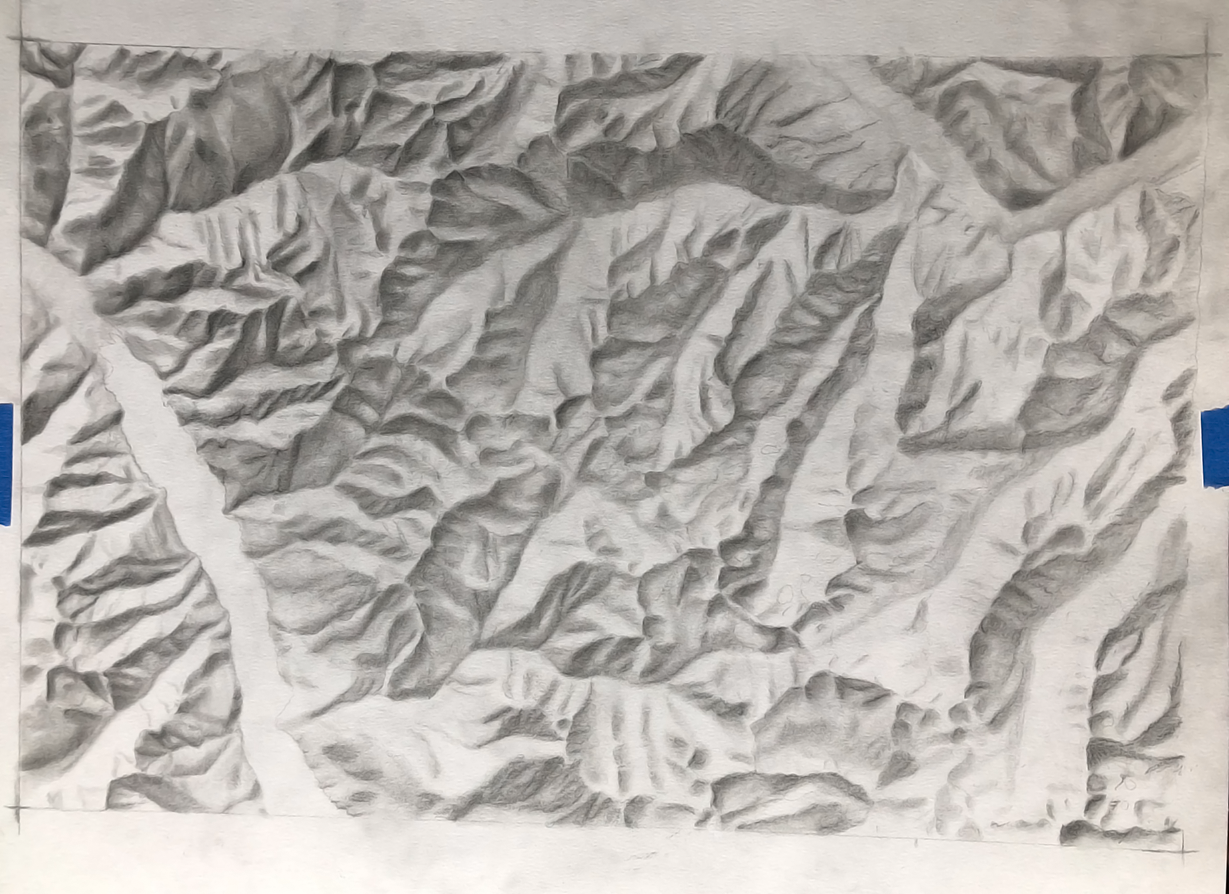
I wrote a tutorial on how I draw shaded relief a few years ago now. It lived on this website before I wiped it to start anew. I had no idea how many people used it until I took it down. Here is the tutorial once again for anyone who wants to follow it or share it. I will write the basic steps, and hope to return to some more detailed steps soon, along with some new drawings – part of taking a step back from my website included drawing, so I have much more to share!
The term for all simulated terrain texture, whether it is via drawing, painting, or digitally rendered is shaded relief. The digital grayscale raster version of shaded relief is technically the only one of these that is hillshade technically. I may use both terms interchangeably throughout this post. I’m at peace with this choice.
Tools you will need
Pencils & erasers
I have drawn hillshades with only a No. 2 pencil from my work bag, but this is only when I’m bored on flights and the window views of the landscape below inspire me to sketch. For best results, I recommend purchasing a few artist-quality pencils of varying softness. I find myself using No. 2 – No. 6, sometimes HB and No. 8. Most often, I reach for the No. 4. Of course, you’ll need a sharpener and erasers too.

Blending stumps (tortillions)
These pencil-shaped rolled up paper sticks are incredibly useful for blending your graphite to blur or smooth out lines across your landscape. You can find them at your local art store in varying hardnesses and sizes.
Artist quality paper
I like to have paper that has a bit of tooth. The higher the tooth, the rougher the paper. You don’t want paper so rough that the paper itself adds dimension to your hillshade. But you want it to be rough enough that it holds on to that softer graphite. Most of my hillshades have been drawn on Strathmore 400 Series, but I’ve also used the 300 series, and it worked wonderfully as well. I also recommend using a sketchpad for your warmups and the practice hillshades. Keep in mind that the paper can make a big difference in how your graphite is applied and how it blends.
Reference image
Below is a hillshade image of Mount Saint Helens that I created from a DEM using ArcGIS Pro. In the future, I hope to make some of my hillshade images available for download if you need reference material or inspiration for your own work.
When getting started, I also recommend choosing a mountainous area rather than a flatter landscape. Although it might seem counterintuitive, mountainous terrain is often easier to draw. Flatter areas tend to contain more subtle changes in elevation, which can be more difficult to recognize and represent accurately when you are learning the technique.
Use your reference image throughout the entire process.

Helpful hint – Desaturate your reference photo.
Did you find a beautiful shaded relief map that you want to draw? Great! If it is in color, open it in a program like Photoshop and desaturate it. This will make identifying the values (the light and dark areas) much easier. You will be essentially capturing the values of the terrain throughout the entire process.

Step 1. Warmup
You have your reference image and music ready. Now it’s time to warm up. Don’t skip this step. It helps get into the flow. The way I might recommend to warm up is to read through all the steps below, and apply them to some simple shapes.

Step 2. Identify the light source
As graphite artists, we are essentially capturing light on paper until the terrain takes form. When mapmakers create hillshades or shaded relief from digital data such as DEMs, there is no real light source. Instead, GIS software allows us to choose the location of the light source digitally, including its direction, altitude, and brightness.
In cartography, we almost always place the light source in the northwest and have it “shine” toward the southeast (assuming north is at the top of the map). The reason for this convention is that our brains are accustomed to light coming from above. As a result, we automatically interpret shaded relief correctly when the illumination originates from the north, and usually northwest.
Notice that terrain perception can be completely altered simply by changing the orientation of an image. For example, the two images below are identical.

The image on the left shows a northside-down view of Mount Saint Helens. With the light source remaining in the northwest (lower-right of the left image), the volcano takes on the appearance of a crater. High points are perceived as depressions, causing ridges and peaks to look like canyons, dips, or valleys.
The image on the right uses the same hillshade and the same light source position (still northwest), but the image is displayed in its more familiar orientation, with north at the top. Because the illumination now appears to come from the upper-left, our brains interpret the terrain correctly and the volcano regains its expected three-dimensional form.
Study your reference image. Notice where the slopes are illuminated and where they are shaded. Understanding how the light affects terrain is an important skill for drawing hillshade.

Step 3. Sketch the ridgelines
The ridgelines and deep valley floors are the framework of your drawing. These features divide the dark and light values across your mountainous terrain.
The first step in the drawing process is to sketch these ridgelines and valley floors. Use a softer pencil, as the lines will be blended later and should not remain overly stark. I like to use a No. 4 pencil when sketching ridges and valleys. It blends easily, but not so easily that I lose the lines too quickly.

Step 4. Shade the shadows
I cannot recall what I called this step in my original publication of this tutorial. But I like ‘shade the shadows,’ because that is what you are doing. Using a softer pencil like a No. 4 or 6, tilt your pencil so that you are not drawing a harsh line. In this step, what you are doing is adding shade softly to the shaded sides of your ridges and valleys – that wonderful framework you created in step 3 – that you will blend in step 5. So you want to keep it blendable. The pressure should not be firm, but it should be enough that you start seeing some darker values on your shadier terrain.
Do not get frustrated if your map does not look like a proper hillshade yet. You will keep working on this after step 5 & 6 and soon the landscape will emerge!
Step 5. Blend
It’s time to use those stumps! With your tortillion, start blending the graphite that you put on your paper in step 4. You will essentially be drawing with your paper stump by moving around the graphite. Pull, or move, the graphite downslope to accentuate the shady side of your terrain. Oftentimes, the darkest parts of the landscape are at the top of the ridgeline, just on the other side of the crest. So the gradient this blending step creates often mimics the real lighting of the terrain. This is the step when your hillshade starts to look like a real mountainous landscape.
Step 6. Highlight
You are going to shade and blend repeatedly. Sometimes, you’ll also need to make those lighter sides of the terrain brighter. To do this simply use your eraser. This will really help illuminate the sunnier sides of your landscape.
Step 7. Repeat!
Keep doing steps 4 & 5 (and 6 when needed) until you have the desired appearance of your hillshade map. Have patience. For almost every hillshade I have drawn – or every drawing for that matter – I’ve reached a point about 1/3 of the way in where I lose belief that it will materialize into something worthwhile. And every time I prove myself wrong. It is a wonderful relaxing journey. If you are willing to share your drawing, feel free to post-mention me on bluesky or LinkedIn. I’m @sarahbell.bsky.social. I enjoy seeing your maps.
Videos & posts of some previous sketches
YouTube video timelapse of shaded relief, Knik Glacier, Alaska